
If you work with Microsoft cloud services very much you will have noticed that the service telemetry is often available using Kusto Query Language via Azure Data Explorer. The online documentation explains that Kusto Query Language is a powerful tool to explore your data and discover patterns, identify anomalies and outliers, create statistical modeling, and more. Kusto queries use schema entities that are organized in a hierarchy like SQLs: databases, tables, and columns. What is a Kusto query? A Kusto query is a read-only request to process data and return results. The request is stated in plain text, using a data-flow model that is easy to read, author, and automate. Kusto queries are made of one or more query statements.
KQL has been my favorite tool for years since it allowed me to identify service problems, gauge feature performance against desired results, and condense the information so that it made sense when put into a visual display like a chart. KQL allows for concise, quantifiable answers from large sets of data from one or more databases which can be tough to do using other methods.
As you would expect, KQL’s extensibility and ease of use is one reason it is used so much by Azure services. Another big selling point is how easy it is for a service to set up and use. KQL is prevalent throughout Azure due to that ease of ingesting service telemetry from Cosmos databases. Azure Cosmos DB in turn is the typical database used due to its versatility as a static data store for basic telemetry or as part of an event-driven architecture built with Azure Data Factory or Azure Synapse. KQL (via Azure Data Explorer or Azure Log Analytics) and Cosmos DB technologies fit together very well for a solution which can help handle large sets of data in a performant way and still allow for insights into service specific and even answer cross-functional questions. We’ll talk in a later blog about how important planning service telemetry is when creating a new software product or service.
Azure Sentinel provides KQL access for performing advanced analysis of activity from multiple sources combined with User and Entity Behavior Analytics (UEBA). If you are not lucky enough to have Sentinel Azure Active Directory by itself allows you to review tenant-specific telemetry using KQL once it is published to an Azure Log Analytics workspace (albeit without the UEBA analytics). The data alone can be useful for understanding what ‘normal’ looks like in your environment or in threat hunting. The steps to sending the telemetry to your workspace and configuring retention and other settings can be found at this link.
Now that we know KQL is used with Azure AD let’s go over how to use it with a few real-world security scenarios.
One of the better-known avenues for exploitation of Azure AD is via AD on premises. AD is 23 years old now and though Microsoft does a great job of security updates and recommended controls the fact is that the AD attack surface is very large-especially if organizations do not maintain good security posture. It is a large and attractive target which means it is important to review the actions of newly synchronized users.
KQL can be used to query Azure AD and identify newly synced users and what those newly synced users have changed recently. This is a simple technique to use if you have a suspicion or just want to do a spot check. For routine matters I highly recommend using a solution which uses machine learning or AI to sift through the data and identify suspicious activity.

Figure 1 Log Analytics query for interesting audit events. Blurring and cropping to protect the innocent. Query text at bottom of article.
The data is exportable for preservation and review. When reviewing note that there are three rows in the query which will indicate that a new user was synced and the identity of that new user: Actor, OperationName, and TargetObjectUPN. We can use the Actor field since Azure AD hybrid sync automatically creates an AD on premise identity named something with SYNC-HOST in the string. The other indicators are OperationName is AddUser and of course the TargetObjectName for the identity.
Note that if your organization uses another principal for their sync service account you could add a line to select only that service principal name in the query like | where Actor = ‘actorstring’.
KQL’s real power comes into play when you can combine two or more databases together and query that data to gain a broader picture of a scenario. This is essentially what Sentinel and other services do albeit with the added special sauce of behavioral analytics and scoring algorithms.
For example, if you have a suspect or suspects you can also see which SaaS applications the identity has signed into recently to help gauge their sketchiness by reviewing the AAD audit logs with the sign in logs for the same identities. In the example below we are not filtering on a specific identity-though we could add a where statement to do that-but are querying for what any user who has been recently added via sync is signing into. You can perform a more targeted search by removing the remark on line 16 and looking to see if they sign into specific applications. For example, a user signing into “Azure Active Directory Powershell” immediately after sync could mean shenanigans.
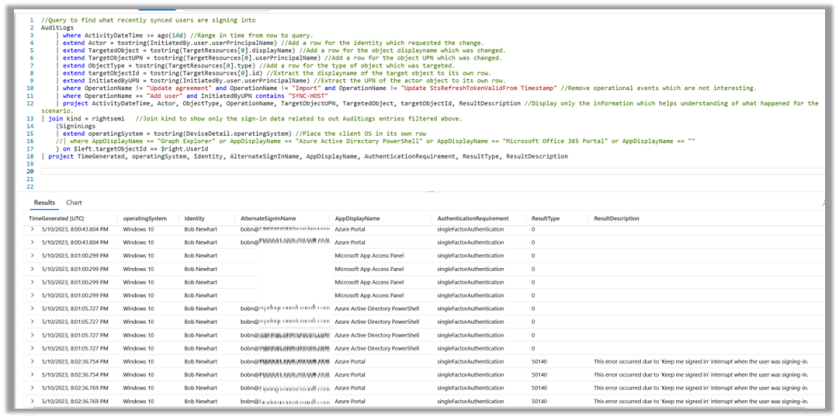
Figure 2 Log Analytics query for interesting signin events. Blurring and cropping to protect the innocent. Query text at bottom of article.
Understanding Azure data and how it can be reviewed using Kusto Query Language queries is necessary for any security minded person. It can help to better understand information which is already present by filtering out data which is not necessary, extract relevant information from results spanning multiple databases, or even spot trends or anomalies. The ability to construct KQL queries is a valuable skill, and hopefully one that this blog post will has helped you strengthen.
Audit Log query
AuditLogs
| where ActivityDateTime >= ago(3d) //Range in time from now to query.
| extend Actor = tostring(InitiatedBy.user.userPrincipalName) //Add a row for the identity which requested the change.
| extend TargetedObject = tostring(TargetResources[0].displayName) //Add a row for the object displayname which was changed.
| extend TargetObjectUPN = tostring(TargetResources[0].userPrincipalName) //Add a row for the object UPN which was changed.
| extend ObjectType = tostring(TargetResources[0].type) //Add a row for the type of object which was targeted.
| where OperationName != “Update agreement”
and OperationName != “Import”
and OperationName != “Update StsRefreshTokenValidFrom Timestamp”
//Remove operational events which are not interesting.
| project ActivityDateTime, Actor, ObjectType, OperationName, TargetObjectUPN, TargetedObject, ResultDescription //Display only the information which helps understanding of what happened for the scenario.
Query to see what recently added users (via AAD Connect sync) have signed into
//Query to find what recently synced users are signing into
AuditLogs
| where ActivityDateTime >= ago(14d) //Range in time from now to query.
| extend Actor = tostring(InitiatedBy.user.userPrincipalName) //Add a row for the identity which requested the change.
| extend TargetedObject = tostring(TargetResources[0].displayName) //Add a row for the object displayname which was changed.
| extend TargetObjectUPN = tostring(TargetResources[0].userPrincipalName) //Add a row for the object UPN which was changed.
| extend ObjectType = tostring(TargetResources[0].type) //Add a row for the type of object which was targeted.
| extend targetObjectId = tostring(TargetResources[0].id) //Extract the displayname of the target object to its own row.
| extend InitiatedByUPN = tostring(InitiatedBy.user.userPrincipalName) //Extract the UPN of the actor object to its own row.
| where OperationName != “Update agreement”
and OperationName != “Import”
and OperationName != “Update StsRefreshTokenValidFrom Timestamp”
//Remove operational events which are not interesting.
| where OperationName == “Add user”
and InitiatedByUPN contains
“SYNC-HOST”
| project ActivityDateTime, Actor, ObjectType, OperationName, TargetObjectUPN, TargetedObject, targetObjectId, ResultDescription //Display only the information which helps understanding of what happened for the scenario.
| join kind = rightsemi //Join kind to show only the sign-in data related to out AuditLogs entries filtered above.
(SigninLogs
| extend operatingSystem = tostring(DeviceDetail.operatingSystem) //Place the client OS in its own row
//| where AppDisplayName == “Graph Explorer” or AppDisplayName == “Azure Active Directory PowerShell” or AppDisplayName == “Microsoft Office 365 Portal” or AppDisplayName == “”
) on
$left.targetObjectId == $right.UserId
| project TimeGenerated, operatingSystem, Identity, AlternateSignInName, AppDisplayName, AuthenticationRequirement, ResultType, ResultDescription
 The Road to Take